Frontend
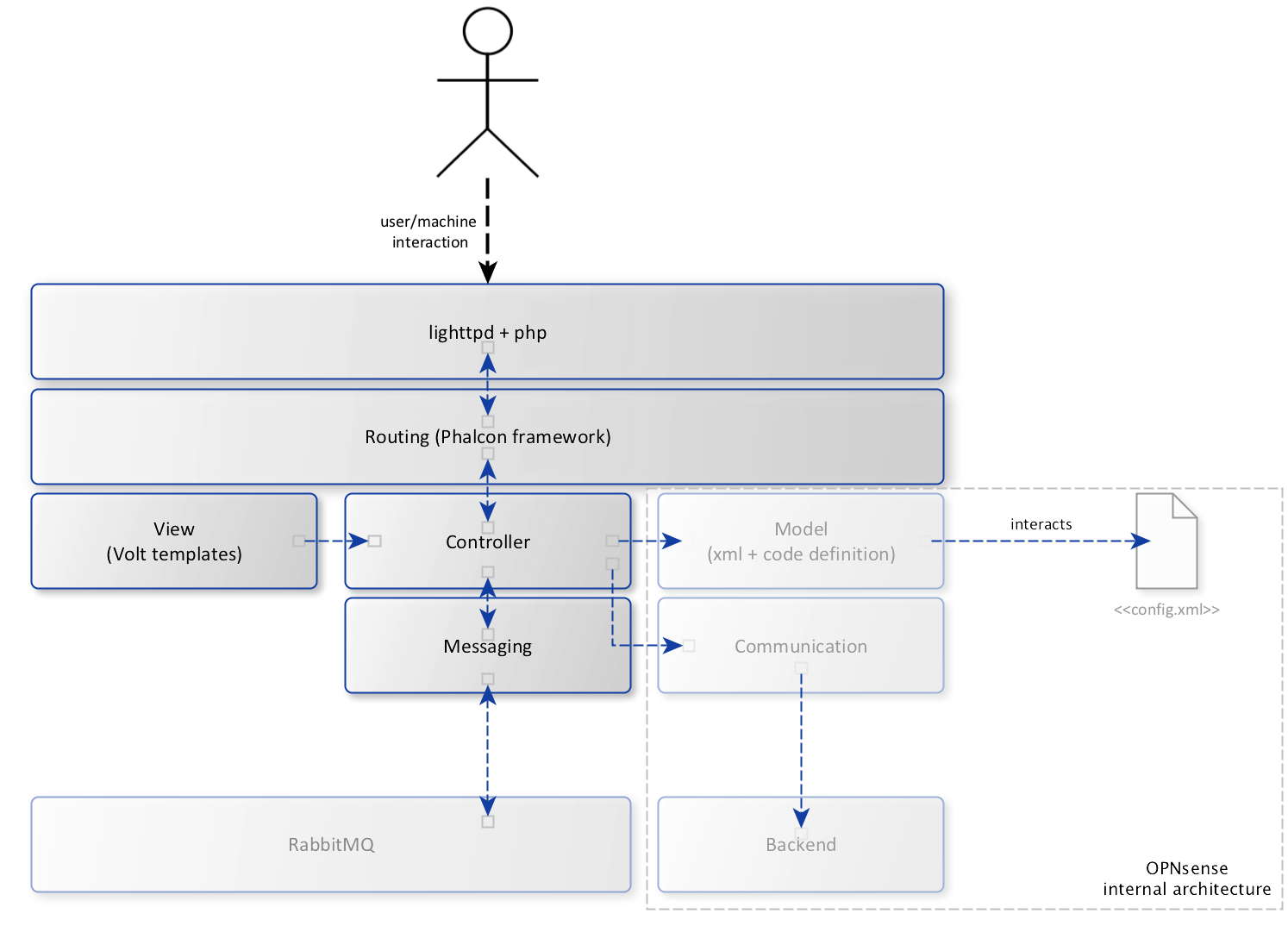
As described in the high level architecture, the frontend components are using an OPNsense firewall as base system.
Webserver
The gui pages and api endpoints are served using lighttpd, which is available by default in OPNsense. Every call to non static pages (not being javascript, css, etc) is processed using php and the Phalcon framework. When using the ValueA components, you normally don’t have to develop in php, only some simple templates need to be filled.
Routing
The framework uses components from Phalcon where possible; the first layer initializes Phalcon’s routing, which handles requests and delivers them to the controller based on its url. User content is generated using Volt templates, which are picked by the controller. Our system uses two main directories, which are routed using Phalcon:
/ui/ for the user interface parts
/api/ used for webservices (REST)
The routing system checks for the existence of a controller in a certain path on the system, both types (ui/api) use a slightly different path.
User interface page controllers are published in directories using the following mask:
/usr/local/opnsense/mvc/app/controllers/Vendor/Package/ModuleController.php
API calls can be found in these directories:
/usr/local/opnsense/mvc/app/controllers/Vendor/Package/Api/ModuleController.php
For example, our setup page containing a simple framework test is published on https://<host>/ui/valueacore/ calling a service at https://<host>/api/valueacore/test/test/, these two controllers are published on the following locations:
/usr/local/opnsense/mvc/app/controllers/ValueA/ValueACore/IndexController.php
/usr/local/opnsense/mvc/app/controllers/ValueA/ValueACore/Api/TestController.php
Note
The above example might look a bit confusing because of the IndexController, when we’re opening a package and don’t define a specific module it would automatically route back to index. / -> index
Controllers
After routing is performed, the controller takes care of the actual code to execute for the request. Because we need some basics for every request that gets processed you should inherit from the base classes provided to ensure basic functionality such as authorisation, authentication and csrf protection.
Controllers are placed in the directories described in the routing section and should use the standard Phalcon naming conventions, suffix Controller.php on every class file and suffix Action on all action methods.
For a detailed description of how Controllers work in Phalcon, please look at the Phalcon documentation
User interface pages (/ui/) are usually inherited from \ValueA\Base\IndexController api endpoints use ValueA\Base\ApiQueueControllerBase by default.
Views
To generate user accesible web pages you can create templates based on Volt, which are attached to the request using the controller. Volt templates are stored in /usr/local/opnsense/mvc/app/views/<Vendor>/<Package>/<template>.volt
Messaging
This is where the ValueA core components come in, to simplify the process of performing calls to RabbitMQ we’ve developed an easy to use standard controller which uses a simple xml type definition to bind actions.
A simple sniplet of a service binding looks like this:
<route>
    <test>
        <bind>valuea.test.echo</bind>
        <type>POST</type>
    </test>
</route>
When used in a controller named TestController and package directory core, this will transport a http POST message on https://<host>/api/core/test/test to RabbitMQ containing valuea.test.echo as requested service, its payload (message) is send together with the call.
The service binding will open a new queue on RabbitMQ for the response and starts waiting for it.
OPNsense internals
The diagram contains some parts of the OPNsense internal architecture, which we’re not going to describe in detail here, as they control modules inside the firewall system itself. Our RabbitMQ configuration for example uses (parts of) this components.
For more details about these components (model definitions, configuration handling, etc), please visit docs.opnsense.org