Data Collection Engine
The Data Collection Engine (DCE) provides services to deliver data from one system to another where the transfer should be secure and the completeness of the delivery is guaranteed.
Overall view / Architectural concerns.
In the transportation three definitions are important:
Consumer, the consumer who needs the data.
Provider, the supplier of the data. Mostly these are database applications accessible via SQL.
Data collection service, the service who coordinates the transport between the consumer and the provider.
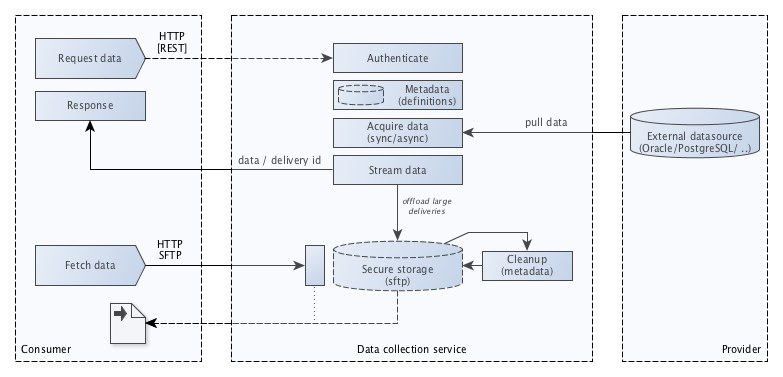
The DCE provides two methods for exchange of data:
Synchronous
Asynchronous
For synchronous the requested data is returned directly in the response of the request.
For asynchronous a handle is returned in the response of the request which later can be used to check if the delivery is complete and is needed to locate the data of the file system where its made available.
Note
For setting the output directory see Configure output directory
As soon as the consumer performs an authorized request, the settings are collected from the metadata. A connection is setup with the provider where the data is collected. Depending of the request is synchronous or asynchronous the data is returned directly or stored on the file system so it can be collected later (via a webservice or secure SFTP for example)
User interface
The Data Collection Engine has a user interface where connections, applications and deliveries can be maintained, the user interface also contains the access control so per delivery the consumers can be authorized to use a specific data collection service.
Connection
A connection provides the necessary information to connect to a data source. The engine uses the provided information to set up a connection to retrieve the data requested.
For a connection the following information is accessible via the user interface:
Attribute |
Description |
|---|---|
id |
System generated UUID for the connection |
description |
Description |
name |
Name of the datasource tot connect to |
engine |
The engine used to build up the connection. Currently two types are supported: Oracle and Postgresql. See also Engines |
user |
User used to logon to the data source |
password |
Password for the given user |
host |
Hostname or ip address where the database server is located |
port |
Port of the database, for defaults see Engines |
Tip
The user interface provides a test button to test the connection. Its the button with the icon located at the right side of the row. If the test is successful the icon changes to , otherwise an error message is displayed and the icon changes to .Application
The application will be used in the endpoint and is necessary to define a delivery.
For an application the following information is accessible via the user interface:
Attribute |
Description |
|---|---|
code |
Code |
description |
Description |
Delivery
The delivery defines the query, with optional parameter(s), to be executed using a specific connection. A specific output type is specified tot control the desired output. The connection server, application code and delivery code are used in the endpoint
For a delivery the following information is accessible via the user interface:
Attribute |
Description |
|---|---|
id |
System generated UUID for the connection |
enabled? |
Indicator to, temporary, enable or disable a specific delivery |
asynchronous? |
Indicator to specify if the delivery is synchronous or asynchronous |
code |
Code, used in the endpoint |
description |
Description |
ttl |
The retention period for asynchronous data delivery in seconds, default is 86400 (1 day). When the retention period is expired the messages stored on disk for this delivery will be removed. Logging retention period is twice the ttl. After that period the logging also will be removed. |
output type |
See Output Types |
application |
See Application |
connection |
See Connection |
query |
The query to be executed returning the desired data |
parameters |
Parameters to be used in the query which can be passed as arguments to the data collection service. A parameter is defined by a name, can have a default and has a type (number or string). |
Tip
The user interface provides a test button to test the delivery. Its the button with the icon located at the right side of the row. If the test is successful the icon changes to , otherwise an error message is displayed and the icon changes to . For testing the query is executed and one row is fetched.Tip
The user interface provides an info button which shows the URL(s) for the data collection service(s). Its the button with the icon located at the right side of the row.Details
Engines
An engine is used to build up the connection with the datasource so a query can be executed and the resulting data can be returned to the consumer.
Currently two engines are available:
Oracle
PostgreSQL
Default values per engine:
Engine |
Attibute |
Default |
|---|---|---|
Oracle |
port |
1521 |
PostgreSQL |
port |
5432 |
Endpoints
For a consumer to collect data for a specific delivery one or two endpoints are made available per delivery. One if the delivery is synchronous and two if the delivery is asynchronous, one for the request and one to get the data.
https://[server]/api/dce/delivery/request/[app]/[service]/
https://[server]/api/dce/delivery/fetch/[app]/[service]/[message-number]
Where server is the host of the data collection engine, app is the code of the application used in the delivery and service is the code of the delivery.
The response for a synchronous request is:
{
    "delivery_status": "sync",
    "delivery_uuid": "[id of the delivery]",
    "message_id": "[message id]",
    "payload": "[payload]"
}
The response for a asynchronous request is:
{
    "delivery_status": "async",
    "delivery_uuid": "[id of the delivery]",
    "message_id": "[message id]"
}
The data can be fetched using the fetch service using the message number returned in the request.
Access Control
ToDo
Output Types
For asynchronous deliveries the output type can be set. For synchronous deliveries the output type is always json.
The data collection engine currently provides one output format: json.
Output types can be added implementing the BaseParser
Query Definition
In the delivery queries can be defined. The query should be in a format which can be handled bij the engine used for the delivery. This also the case for the parameters provided.
Example query with parameters for the Oracle engine:
select table_name
from all_tables
where owner = %(schema)s
Example query with parameters for the PostgreSQL engine:
select table_name
from information_schema.tables
where table_schema = %(schema)s
Parameter definition (same for both engines):
Parameter |
Default |
Type |
|---|---|---|
schema |
public |
string |
Export and import
For development and testing purposes the registered applications with the deliveries and connections used by it can exported and imported.
For example an application can be created and tested in a development environment, deployed on an acceptance environment and after its accepted it can be deployed on a production environment. For testing purposes an application on a production environment can be exported there and imported on a specific test environment.
The export format is in JSON and when exporting the following applies:
Passwords stored in a connection are not exported.
The import format is the same as the export format in JSON and when importing the following applies:
Applications are merged, thus created if not existing, otherwise created.
Deliveries are merged.
Deliveries that are not in the import but exist in the target environment are not deleted.
Connections are only imported when they’re non existing.
Note
The UUID used as a primary key for the Application, Delivery and Connection is the key used on import to check if a record already exists. Therefore it is guaranteed that the primary key created on development is also unique on the acceptance and production environment.