11. Using (bpmn 2.0) workflows
The framework comes with a module to use bpmn type workflows, which utilizes an sqlalchemy model to store all of it’s metadata and state information.
To design workflows we use the bpmn2 modeler from eclipse (https://www.eclipse.org/bpmn2-modeler/) and some of the properties available in it.
Documentation about BPMN 2.0 modeling is available from different resources, including the standard documentation of the object management group (http://www.bpmn.org/)
Include workflow model and deploy
We start with adding a module file containing only an import of the workflow system, this adds the workflow to our project.
1from valuea_framework.workflow import *
Next we run a regular deployment to add the workflow schema and objects to our system.
1cd <your project directory>
2deploymodel --rdbms .
Sample use-case
To demonstrate our workflow features, we will create a simple one which will loop for a couple of times, output the sequence and exits when done.
Our example is modelled in eclipse and counts from x to 9 using a script task
which binds to a service, the steps within the workflow are detailed below.

Start the workflow, this is only a marker to teach the engine where to start. Our workflow will except a parameter x here, which defines the start of the process.
Inclusive gateway, continue workflow from one of the incoming source arrows.
The script task to run, which excepts x and returns
x + 1Exclusive gateway, which evaluates the outgoing flows, where
x < 10returns to 2 andx >= 10goes to 5End event, which marks the workflow ready when reached.
Note
The returning flow from [4] to [2] has a special attribute set to signal the workflow engine about the possibility of going back. This attribute (condition language “roundtrip”) has two different goals. It helps [2] to evaluate the steps that need to be finished before it can proceed (steps in the future can be ignored) and helps [4] to predict future work.
To import the workflow in our database, we can use the import procedure
and install it into our project directory (which contains a valid config).
Given the example bpmn file, we could import the file as follows:
1cd <your project directory>
2python import_bpmn_wf.py <location_to>/test_valuea_loop.bpmn
Most of the bpmn workflow uses the standard (available) types and settings, but we do need some simple mechanisme to instruct tasks what they should do. We support some different field types for this purpose in the property section of the task.
xs:parameter, which supports basic mapping features, like
a->b(input a is named b)xs:constant maps static values to the input of a service step, like
value->bto match the string “value” to bxs:service binds a service to it. The parameter tag
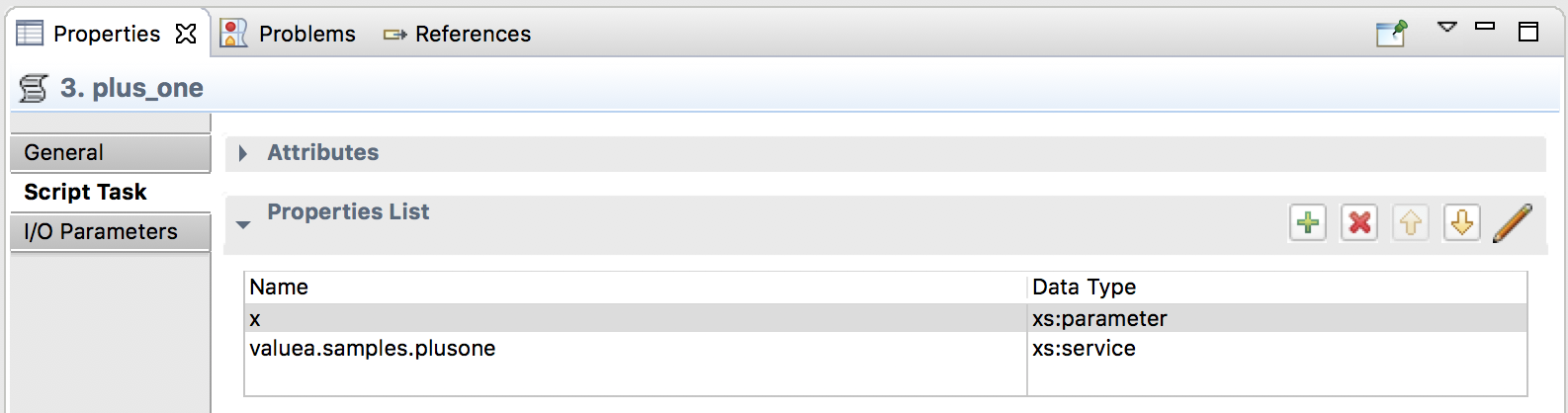
Add “plus_one” service
Our workflow consists of one simple task which should be executed until the variable x has reached (but not including) 10.
As usual we first start with a simple service, which in this case prints x and adds one upon calling execute().
 1import valuea_framework.broker.Service
 2
 3
 4class Service(valuea_framework.broker.Service.BaseService):
 5    def __init__(self, *args, **kwargs):
 6        super(Service, self).__init__(*args, **kwargs)
 7
 8    def execute(self):
 9        print (self.get_message(True).x)
10        return {'x': self.get_message(True).x+1}
11
Next we validate our input data, so we can safely assume the variable x being an integer value.
 1{
 2	"$schema": "http://json-schema.org/draft-04/schema#",
 3	"description": "plusone",
 4	"properties": {
 5		"x": {
 6			"type": "integer"
 7		}
 8	},
 9	"required": [
10		"x"
11	]
12}
Putting it all together
To test it locally we will request a database session, like our RelationalService would do internally, using that
session we will search for the workflow defined in the sample use-case “test_valuea_loop.bpmn” and execute it using
run().
1import valuea_framework.connectors.rdbms
2from model.valuea.wfsample.workflow import Workflow
3rdbms_session = valuea_framework.connectors.rdbms.ORM().session()
4wf = rdbms_session.query(Workflow).filter(Workflow.name == 'test_valuea_loop.bpmn').first()
5if wf:
6    wfi = wf.create_instance(x=0)
7    wfi.run()
8else:
9    print ("workflow test_valuea_loop.bpmn not loaded")
The following output should be shown:
0
1
2
3
4
5
6
7
8
9
Note
The run() without parameters will keep the workflow running as long there’s
no movement or an end status is reached. Starting with run(single_pass=True)
will only execute one pass and exit.
Cleanup
Workflow states are saved after execution, in case you want to delete all finished instances of the workflow in our example, you can easily do so with a few lines of codes.
 1import valuea_framework.connectors.rdbms
 2from model.valuea.wfsample.workflow import Workflow, WorkflowInstance
 3
 4rdbms_session = valuea_framework.connectors.rdbms.ORM().session()
 5wf = rdbms_session.query(Workflow).filter(Workflow.name == 'test_valuea_loop.bpmn').first()
 6
 7if wf:
 8    for wfi in rdbms_session.query(WorkflowInstance)\
 9            .filter(WorkflowInstance.status == 'FIN')\
10            .filter(WorkflowInstance.workflow_id == Workflow.id):
11        rdbms_session.delete(wfi)
12    rdbms_session.commit()
The code above finds our workflow, then queries all finished instances and deletes them one by one (in cascading mode).
Next steps
You can easily use workflows in regular services or scripts.