Data Quality Engine
Introduction
The data quality engine consists of a set of functions to help classifying data from different sources and detect functional anomalies.
Schematically the workflow for classifying data is as follows:
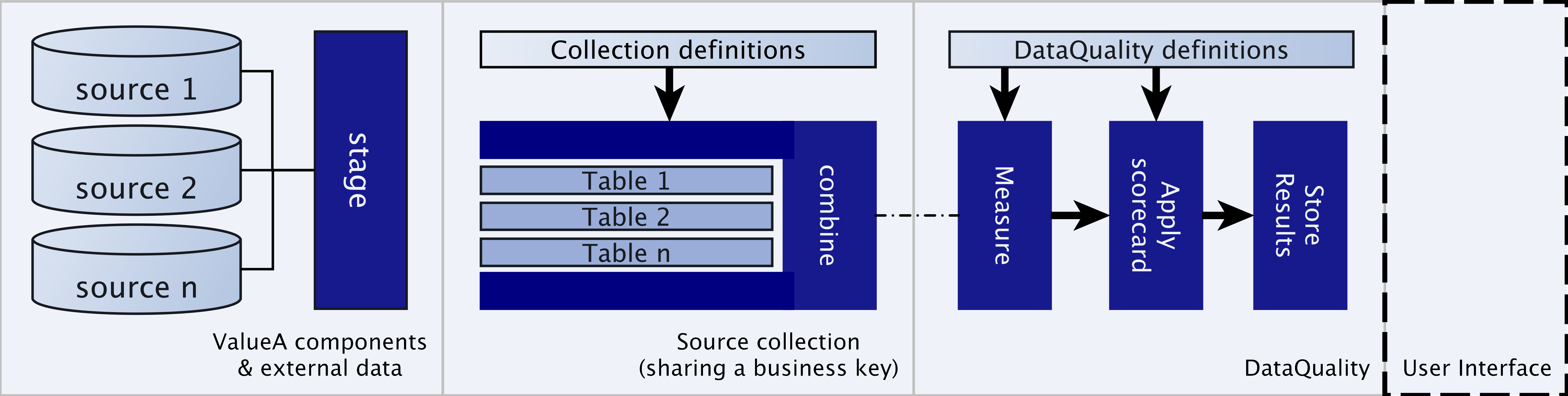
Where DQE assists in combining, measuring and scoring your dataset assuming the data is already staged into your database.
Installation
The package comes with a model and some basic services to guide you through the process, both can be imported from the ValueA framework package, using the following code.
1from valuea_framework.model.valuea.dq import *
1import valuea_framework.services.valuea.dq
2import pkgutil
3__path__ = pkgutil.extend_path(valuea_framework.services.valuea.dq.__path__,
4                               valuea_framework.services.valuea.dq.__name__)
The first block adds the model for deploymodel --rdbms, the other block imports our standard services into the valuea.dq namespace.
A basic frontend package is available with os-valuea-dqe-X.X.X.txz, which installs an admin module to upload and
download definitions (using excel) and an application to inspect results.
Sample use-case
For our sample use-case we pretend to have connections and usage statistics for which we want to search some anomalies, like out of range uses or missing master data.
To keep it simple, we will import two tables containing master data and usage data.
Prepare sample dataset
First we will add a model containing the two tables, and deploy them to our database.
 1import sqlalchemy
 2from valuea_framework.connectors.rdbms_model.core import BaseModelMixin
 3from valuea_framework.connectors.rdbms_model.base import Base
 4
 5
 6class Connection(Base, BaseModelMixin):
 7    __table_args__ = {u'schema': 'dqe_test'}
 8
 9    Number = sqlalchemy.Column(sqlalchemy.Text, primary_key=True)
10    Type = sqlalchemy.Column(sqlalchemy.Text)
11    Status = sqlalchemy.Column(sqlalchemy.Text)
12    Supplier = sqlalchemy.Column(sqlalchemy.Text)
13
14
15class Usage(Base, BaseModelMixin):
16    __table_args__ = {u'schema': 'dqe_test'}
17
18    Number = sqlalchemy.Column(sqlalchemy.Text, primary_key=True)
19    Amount = sqlalchemy.Column(sqlalchemy.Numeric)
Note
Remember to run deploymodel --rdbms . to persist the changes to our database
With the model in place we can import some data, for this purpose we have added an excel file containing the contents
for both tables (input/dqe_testdata.xlsx).
 1import valuea_framework.file.excel
 2from model.valuea.dqe_test import Connection, Usage
 3from valuea_framework.connectors.rdbms import ORM
 4
 5session = ORM().session()
 6for sheetname, record in valuea_framework.file.excel.reader(filename='input/dqe_testdata.xlsx', yield_sheetname=True):
 7    if sheetname == 'connection':
 8        session.merge(Connection(**record))
 9    elif sheetname == 'usage':
10        session.merge(Usage(**record))
11
12session.commit()
Execute the script, inspect your data and proceed to the next step.
DQE settings
All settings for our measurements can be defined in an excel sheet and uploaded to the system, for this example the
following file is available containing all our settings input/dqe_test_settings.xlsx
The next steps use the definitions created in here.
Defining relations and validations
The data we have loaded contains the following tables and basic loosely coupled relation, the data may (and does) contain usage statistics for unknown connections, since this is an often recurring theme in data quality measurements.
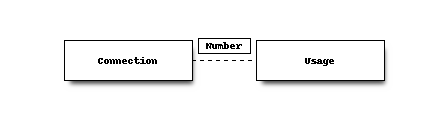
The provided excel contains two tabs to define the source dataset:
collection -> contains the collection definition including generic filters (if any)
source -> source datasets
Note
When adding global filters, you will need to to use the full column names (including table specification). The SQL query which gathers the full dataset needs to understand the syntax.
Note
When debug logging is enabled, all generated queries will be flushed to the log for analysis purposes.
In our case the collection only defines it’s name, the source tab is the important part for which we describe the settings per object below.
all_connections
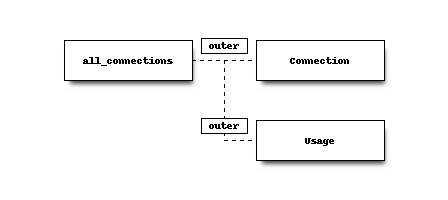
The first object describes the from selection for our query, in this case we generate a keyset containing all known numbers from amounts and connections.
The selection defined here is temporary stored in the database before performing the actual join.
All fields (*) are selected
dqe_test.connection
Connections join with all_connections defined previously, using the defined condition.
All fields (*) are selected
dqe_test.usage
Usage statistics also join to all_connections
All fields (*) are selected
Schematically the executed selection looks as follows:
Note
When a fieldname is not unique, the value for the field is used from the first selected object. In this case “Number” contains all entries from “all_connections”.
Define measurements
The evaluations tab contains all measurements and corresponding scores, we added some simple measurements here:
Active customers (status = ‘Active’)
Missing customer (type is null)
Unexpected business volume (amount < 1000)
Missing supplier (supplier is null)
Every measurement receives a bitmask for easy selection (on execution), which can easily be saved in a fixed result structure
and selected accordingly. selecting mask = 3 for example would match the first two defined measurements.
Note
Currently the maximum number of measurements (equations) per collection is 63 since a bigint type is used
to store the mask (63 + sign bit).
Results
When the measurement is executed all results which have a score higher then 0 are collected into a result set, which is stored in the dq_results schema. Here you will find the following tables, which are used in the standard available services:
resultset –> contains overall run information
resultsetevaluations –> contains the measurements used in this set
results –> contains all measured values where
score > integer(0)including details found in the set and evaluations matched.