General services
Our service implementation is collected in valuea_framework.broker, which contains the necessary components
to construct services and listen for messages on a RabbitMQ queue (using valuea_framework.connectors.rabbitmq.Consumer.RabbitMQRPCConsumer).
How to use services is described in detail in our examples (1. “Hello world!” Service).
BaseService
This is the default service type from where all other services should inherit, either direct or indirect (subclassing direct descendants). Basically this type of service implements all the default handles needed to fit the framework, such as extendable message validation, execution and message parsing.
ServiceRelational
When using sqlalchemy, this type of service prepares a connection and provides some guidance to return standard objects
to the user interface (with object_to_ui).
Using the data from 8. Relational modeling we can output an object using the following example:
 1{
 2	"$schema": "http://json-schema.org/draft-04/schema#",
 3	"description": "get_user_object",
 4	"properties": {
 5		"id": {
 6			"type": ["int", "null"]
 7		}
 8	},
 9	"required": [
10		"id"
11	]
12}
 1import valuea_framework.broker.ServiceRelational
 2import model.valuea.sample
 3
 4
 5class Service(valuea_framework.broker.ServiceRelational):
 6    def __init__(self, *args, **kwargs):
 7        super(Service, self).__init__(*args, **kwargs)
 8
 9    def execute(self):
10        msg = self.get_message(True)
11        user = None
12        if msg.id:
13            user = self.rdbms_session.query(model.valuea.sample.User).get(msg.id)
14        if not user:
15            user = model.valuea.sample.User().load_object_defaults()
16
17        return self.object_to_ui(user)
When execute() is called, this method will try to fetch the requested record [line 13], when not found or an id
wasn’t provided we return a default object. This should ensure that we always receive a structure we can interpret
in the user interface.
Test it locally using:
1#!/usr/bin/env python
2
3import services.valuea.samples.get_user_object
4
5srv = services.valuea.samples.get_user_object.Service()
6srv.set_message({'id': 1})
7print (srv.execute())
Note
When the model object passed into object_to_ui contains foreign keys or choice fields, these will be converted
to lists of items containing all the available and selected options.
ServiceRelationalSearch
This type of service derives from ServiceRelational and contains the default parameters and handles needed for the grid component we use (bootgrid).
 1{
 2	"$schema": "http://json-schema.org/draft-04/schema#",
 3	"description": "search_users",
 4	"properties": {
 5		"rowCount": {
 6			"type": "integer"
 7		},
 8		"current": {
 9			"type": "integer"
10		},
11		"searchPhrase": {},
12		"sort": {}
13	},
14	"required": [
15		"rowCount"
16	]
17}
 1import valuea_framework.broker.ServiceRelationalSearch
 2import model.valuea.sample
 3
 4
 5class Service(valuea_framework.broker.ServiceRelationalSearch):
 6    __query_fieldnames__ = ['id', 'name']
 7    __search_fieldnames__ = ['name']
 8
 9    def get_query(self):
10        return self.rdbms_session.query(model.valuea.sample.User).subquery()
11
12    def __init__(self, *args, **kwargs):
13        super(Service, self).__init__(*args, **kwargs)
The __query_fieldnames__ and __search_fieldnames__ define the fields returned by the call and get_query()
specifies which data should be acquired using this search operation.
To test this locally, use:
1#!/usr/bin/env python
2
3import services.valuea.samples.search_users
4
5srv = services.valuea.samples.search_users.Service()
6srv.set_message({'rowCount': 10})
7print (srv.execute())
ServiceDistributed
Our distributed service can be used to compute in parallel, a configuration file is needed to setup the communication, similar to:
1[default]
2host=192.168.56.101
3username=admin
4password=admin
5exchange=default_exchange
Where the tag [default] is used to refer to a specific channel setup, which can use a different queue configuration.
The service itself supports two main handles, push_request(endpoint, content) to push messages back to the queue
for further processing and fetch_results() to fetch results until all requests are processed or timeouts are reached.
Conceptually this type of service is used as a message coordinator which divides work until all is done.

Tip
When using a distributed service, make sure you either use different queues for the workers to avoid blocking regular services or throttle the number of request pushed at the same time with the service.
ServiceQueueOnly
The queue only service type is available for asynchronous services.
Like the ServiceDistributed this type needs the same configuration to identify the target which will receive
the asynchronous commands.
A regular workflow for an asynchronous service looks like this:
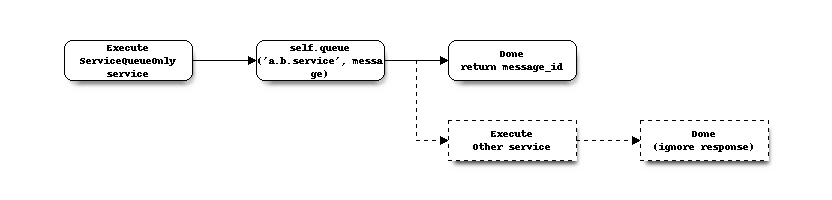
Where the execute is similar to any other type of service, which should use the queue action to offload the actual
command to another worker and return the generated message id back to the user.
Our service might look similar to the following, where we are going to execute the valuea.samples.plusone
service asynchronous, if extensive message logging is enabled you should be able to fetch the result although it is not send to any real client.
 1import valuea_framework.broker
 2
 3
 4class Service(valuea_framework.broker.ServiceQueueOnly):
 5    def __init__(self, *args, **kwargs):
 6        super(Service, self).__init__(*args, **kwargs)
 7
 8    def execute(self):
 9        return {'messageid': self.queue('valuea.samples.plusone', {'x': 1})}
10